If you are comparing Adobe Substance 3D Sampler with Seamless Texture Generator, the main question is not which one is more powerful. Adobe Substance 3D Sampler is a professional material tool. Seamless Texture Generator is a faster browser workflow for creating and checking tileable texture images.
Use Adobe Substance 3D Sampler when you need a deeper material pipeline with maps and Substance ecosystem support. Use Seamless Texture Generator when you want to generate or repair a repeat-ready texture quickly, inspect it as a tile, and export a PNG for games, Blender tests, wallpaper, fabric ideas, or product mockups.
Research snapshot: public product and pricing pages checked on June 14, 2026. Adobe describes Sampler as a way to turn images into 3D materials and lists Substance 3D pricing from US$19.99/month on its Sampler page and plans page.
Quick comparison
| Category | Seamless Texture Generator | Adobe Substance 3D Sampler |
|---|---|---|
| Best fit | Fast tileable texture generation and image-to-seamless conversion | Professional 3D material creation |
| Starting point | Text prompt or uploaded image | Photos, scans, prompts, and material workflows |
| Repeat checking | Built-in 3×3 default preview plus Single, 2×2, and 5×5 with seam guide | More advanced material workflow, but not framed as a simple tile-check page |
| Output focus | Downloadable tileable PNG textures | 3D materials and supporting maps |
| Learning curve | Low | Medium to high |
| Public price signal | Starter at $19.90/month; Creator at $39.90/month; Studio at $79.90/month | Starts at US$19.99/month; Substance 3D Collection at US$49.99/month |
When Seamless Texture Generator is the better fit
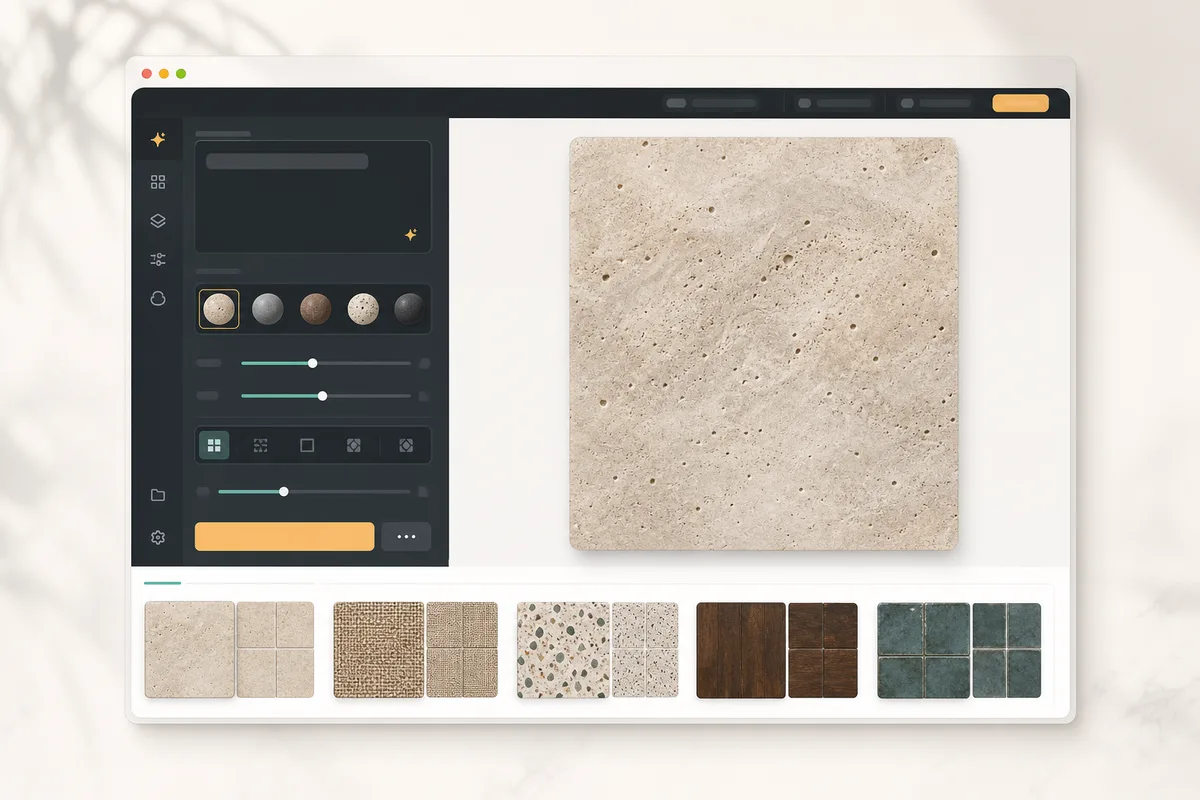
Seamless Texture Generator is strongest when the texture itself is the job. You describe a material, generate a square texture, switch to tiled preview, inspect the center cross, and download the result.
That workflow is useful when you need:
- a stone floor texture for a game prototype
- a fabric or wallpaper repeat to test an idea
- a quick Blender material base color
- a tileable background for a mockup
- a way to convert an existing image into a cleaner repeat
The tool is intentionally narrow. It does not ask you to understand a full material stack before you can test a surface.
When Adobe Substance 3D Sampler is the better fit
Adobe Substance 3D Sampler is stronger when you are building production materials, not just exploring texture directions. Adobe highlights image-to-material workflows, text-to-texture generation, and material map creation, including normal, displacement, and roughness maps.
Choose Adobe when you need:
- deeper PBR material control
- integration with a professional 3D art pipeline
- map generation and material editing
- consistency with other Substance 3D tools
- a larger asset ecosystem
For experienced 3D artists, that depth matters. For someone who only needs a clean tileable PNG, it can be more tool than the task requires.
Feature-by-feature comparison
Prompt-to-texture generation
Both tools can support AI texture workflows, but they frame the job differently. Seamless Texture Generator wraps the prompt around texture-specific constraints such as top-down view, flat lighting, no border, and square repeat. Adobe's Sampler sits inside a broader professional material workflow.
Bottom line: use Seamless Texture Generator for fast texture ideation. Use Adobe when prompt generation is one step inside a larger material process.
Image-to-texture workflow
Seamless Texture Generator includes an image-to-seamless workflow for starting from a photo, scan, render, or pattern reference. The goal is simple: repair edge issues, preview the repeat, and download a tileable PNG.
Adobe Substance 3D Sampler is much stronger when the image needs to become a full material, not just a repeatable image. If you need supporting maps and advanced material control, Adobe has the advantage.
Repeat inspection
A texture can look good as one square and still fail when tiled. Seamless Texture Generator puts repeat inspection directly in the workflow with single-image and tiled preview states.
Adobe can fit into a repeat-checking workflow too, but the public product positioning is broader: material creation, map editing, and professional pipeline work. For quick quality control, the focused preview flow is easier.
Pricing and commitment
SeamlessCanvas uses a subscription-first credit model. Starter is $19.90/month for 300 credits, Creator is $39.90/month for 1,000 credits, and Studio is $79.90/month for 1,800 credits. Standard repair previews and repeat inspection are free. Unlock a standard repaired image for 2 credits to download every available size, or subscribe for unlimited exports. Paid AI results include downloads.
Adobe's public pricing signal starts at US$19.99/month for Substance 3D texturing access, with the broader Substance 3D Collection listed at US$49.99/month. That can be a good value if you need the full ecosystem. It is less compelling if your main need is quick tileable texture output.
Who should choose Seamless Texture Generator?
Choose Seamless Texture Generator if you:
- want a browser-first texture workflow
- care about repeat preview before downloading
- need fast material ideas for games, Blender, fabric, wallpaper, or mockups
- want to start from either a prompt or an uploaded image
- do not need a full professional material suite
It is especially useful for creators testing many directions before deciding which texture deserves deeper cleanup.
Who should choose Adobe Substance 3D Sampler?
Choose Adobe Substance 3D Sampler if you:
- already work in professional 3D pipelines
- need PBR material maps
- want closer integration with Substance tools
- create materials for production scenes
- expect to refine materials beyond a single tileable PNG
Adobe is the stronger choice when material fidelity, maps, and pipeline integration are more important than speed.
Migration path from a heavy material workflow
You do not have to replace a professional material tool to use Seamless Texture Generator. A practical workflow is to use Seamless Texture Generator for early exploration, then move the best result into your 3D or material toolchain.
- Generate several texture directions from prompts.
- Check each candidate in the default 3×3 repeat preview.
- Download the strongest PNG.
- Test it in Blender, a game surface, or a mockup.
- Promote only the winning texture into a deeper material workflow.
This keeps the early creative loop fast and saves the heavier tools for textures that already repeat well.
Final recommendation
Adobe Substance 3D Sampler is the better choice for advanced material creation. Seamless Texture Generator is the better choice for fast, repeat-aware texture generation.
If your next step is "build a complete production material," start with Adobe. If your next step is "make a tileable texture and see whether it repeats cleanly," open the Seamless Texture Generator.