PatternedAI and Seamless Texture Generator both help create repeating images, but they serve different jobs. PatternedAI is strongest for seamless decorative patterns. Seamless Texture Generator is built for tileable texture assets: stone, wood, fabric, marble, wallpaper, game floors, Blender materials, product surfaces, and other repeat-ready images.
If you want motif-driven pattern design, PatternedAI may be the better starting point. If you want to generate or repair a texture and inspect whether it tiles cleanly, Seamless Texture Generator is the more direct workflow.
Research snapshot: public pages checked on June 14, 2026. PatternedAI positions itself as an AI pattern maker for seamless, royalty-free patterns on its homepage.
Quick comparison
| Category | Seamless Texture Generator | PatternedAI |
|---|---|---|
| Best fit | Tileable texture assets for material and surface workflows | Decorative seamless pattern generation |
| Common use cases | Games, 3D materials, fabric tests, wallpaper, product mockups | Prints, wallpaper, surface patterns, design motifs |
| Starting point | Text prompt or uploaded image | Text prompt or image-to-pattern |
| Repeat checking | Single image and tiled preview with seam guide | Pattern-focused generation experience |
| Output mindset | Texture as an asset | Pattern as a design |
| Pricing | Monthly plans from $19.90 plus no-expiry top-ups | Pricing page exists; verify current plan details before cost comparisons |
The real difference: texture asset vs pattern design
A seamless pattern is usually about rhythm, motif spacing, and decoration. A tileable texture is often about surface believability, scale, lighting, and whether the repeat disappears across a larger area.
That difference matters. A floral wallpaper pattern can have a deliberate rhythm. A stone floor texture should not reveal the same crack every two tiles. A fabric texture needs fiber direction and low-contrast detail. A game wall needs neutral lighting so the tile boundary does not become a visible grid.
PatternedAI is easier to understand as a pattern design tool. Seamless Texture Generator is built around the asset workflow: generate, inspect, adjust, and download.
When Seamless Texture Generator is the better fit
Use Seamless Texture Generator when the output needs to behave like a material or texture asset.
Good examples:
- stone, concrete, marble, wood, bark, moss, fabric, terrazzo, and pixel floor textures
- wallpaper ideas that still need repeat inspection
- uploaded material photos that need edge cleanup
- game prototype floors or walls
- Blender base color textures
- product packaging and mockup backgrounds
If you already know the surface type, start with a focused material page such as the wallpaper pattern generator, concrete texture generator, or pixel art texture generator before opening the studio.
The important step is the tiled preview. A texture that looks good alone can still fail when repeated. Seamless Texture Generator keeps that test close to the download step.
When PatternedAI is the better fit
PatternedAI is a stronger match when the main goal is decorative pattern ideation. Its public messaging emphasizes seamless patterns and royalty-free pattern generation, which fits surface designers, print sellers, wallpaper creators, and visual designers looking for motif concepts.
Choose PatternedAI if you primarily need:
- repeatable decorative motifs
- print or wallpaper pattern ideas
- pattern-first inspiration
- a tool framed around surface pattern design
For these jobs, texture realism matters less than visual rhythm.
Feature-by-feature comparison
Prompt workflow
Seamless Texture Generator encourages texture-first prompting: material, surface detail, scale, lighting, style, and repeat instruction. That helps avoid common AI image problems such as perspective, dramatic shadows, centered objects, and visible borders.
PatternedAI's prompt workflow is better framed for pattern ideas. That is useful for graphic surfaces but can drift away from material behavior if you need a realistic game or 3D texture.
Image upload workflow
Both tools can start from an image. The difference is intent. Seamless Texture Generator's image-to-seamless workflow is for turning a photo, scan, render, or pattern reference into a cleaner repeating tile. That is useful when the source already has the right material character but the edges do not repeat.
PatternedAI's image-to-pattern framing is stronger when the image is a style or motif reference.
Repeat inspection
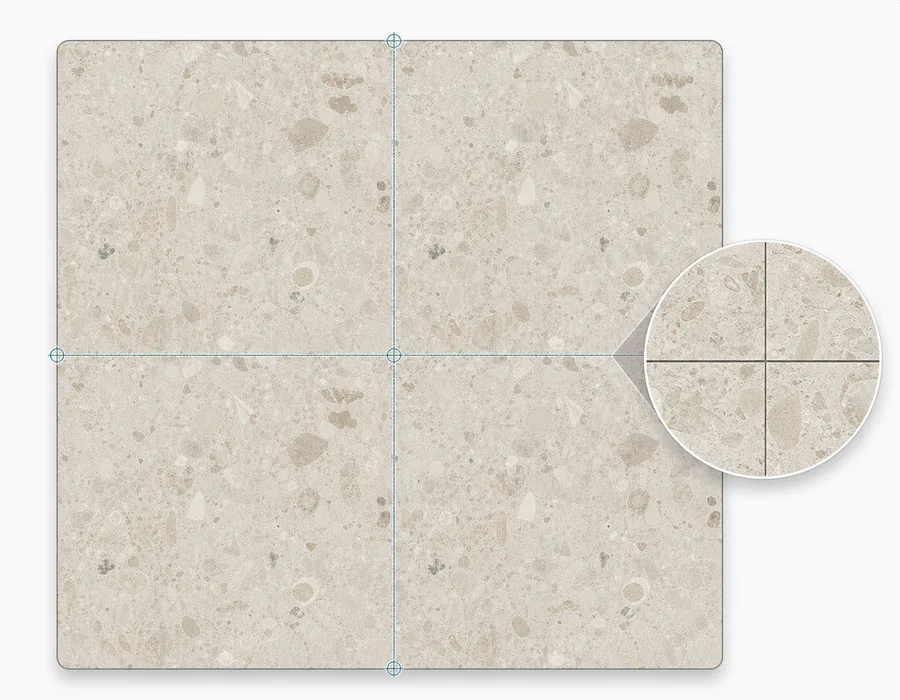
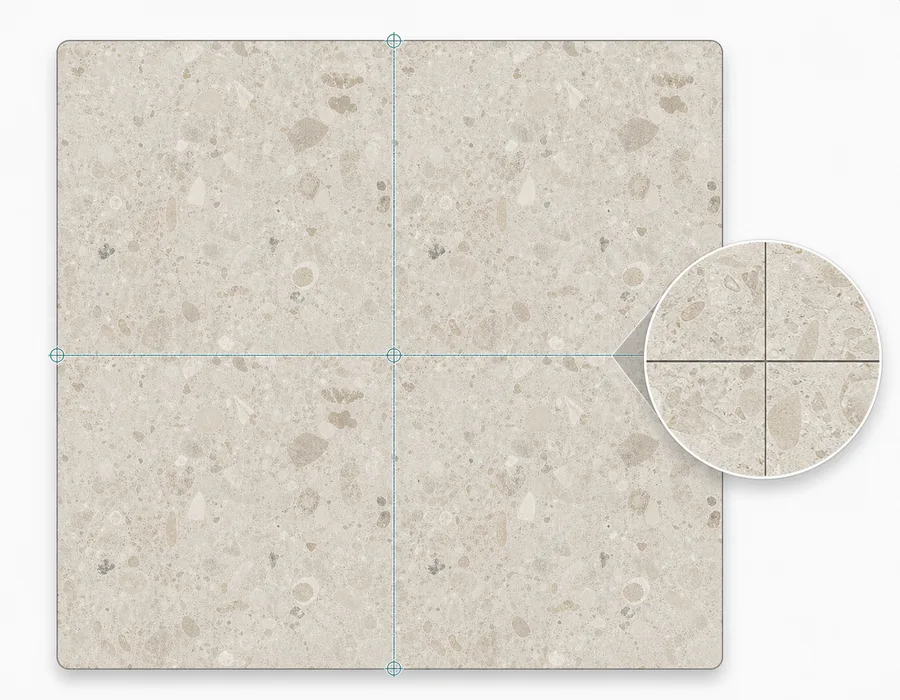
Repeat inspection is where a texture workflow becomes practical. Seamless Texture Generator includes a tiled preview so you can check the center cross where tile edges meet. That helps catch hard seams, lighting shifts, broken cracks, repeated hero shapes, and corner artifacts.
For decorative patterns, a visible repeat can be acceptable or intentional. For materials, it usually breaks the illusion.
Pricing and output planning
SeamlessCanvas currently lists three monthly credit plans: Starter at $19.90 for 300 credits, Creator at $39.90 for 1,000 credits, and Studio at $79.90 for 1,800 credits. One-time top-up credits do not expire. Standard repair previews and repeat inspection are free. Unlock a standard repaired image for 2 credits to download every available size, or subscribe for unlimited exports. Paid AI results include downloads.
PatternedAI links to pricing from its homepage, but this quick scan did not verify exact current plan values. If cost is the deciding factor, check the live pricing page before choosing.
Who should choose Seamless Texture Generator?
Choose Seamless Texture Generator if you:
- need a texture for a game, 3D scene, fabric test, wallpaper mockup, or product surface
- want to inspect the repeat before downloading
- care about top-down, flat-lit, borderless material output
- have an existing image that needs to become tileable
- want a focused texture tool rather than a broader pattern design space
It is especially useful when the texture will cover a large surface and visible repeat problems would be obvious.
Who should choose PatternedAI?
Choose PatternedAI if you:
- want decorative surface patterns
- care more about motif style than material realism
- are exploring print, wallpaper, or pattern library ideas
- want a tool whose core language is pattern generation
PatternedAI fits the design side of seamless imagery. Seamless Texture Generator fits the asset side.
A practical workflow for pattern creators
If you create wallpaper, textile, or print-on-demand ideas, the tools can also complement each other.
- Use a pattern tool to explore motif direction.
- Bring a promising reference into an image-to-seamless workflow.
- Check the repeated tile for broken edges and spacing issues.
- Download a test PNG and place it on a mockup.
- Regenerate or repair before committing to a final design.
The repeat check is the step that keeps a nice-looking square from becoming a distracting pattern once it covers a real surface.
For project-specific planning, use the fabric pattern workflow, product mockup texture workflow, or game texture workflow to decide how the tile will be judged after export.
Final recommendation
PatternedAI is a good fit for seamless pattern design. Seamless Texture Generator is a better fit for repeat-ready texture assets.
If your search is "make a pattern," start with a pattern-first tool. If your search is "make a tileable texture I can test as an asset," open the Seamless Texture Generator or use its texture converter.